



FTLab Wireless Smart Geiger — Part 4
Previous posts:
- FTLab Wireless Smart Geiger — Part 1
- FTLab Wireless Smart Geiger — Part 2
- FTLab Wireless Smart Geiger — Part 3
As seen in my previous post, reverse engineering a custom protocol is a bit of a pain. While looking for information about the device, I found a promising thing: the official Android app.
As stated before, the official apps (Android and iOS) are not available on the App Store or Google Play. But the Wireless Smart Geiger is available on APKPure.
Provenance
There are three versions listed. The newest one is suspiciously too recent (2023 vs. 2017 for the others). But that may be only when the app was uploaded to APKPure.
The newest version (1.0) targets Android SDK 29, which is Android 10, released in September 2019, so it can’t have been made in 2017 like the others.
Maybe it was a simple compatibility update of the app for the new Android.
| Filename | SHA-256 | Date on APKPure | SDK Version | Target SDK Version | Signing certificate SHA-256 |
|---|---|---|---|---|---|
| Wireless+Smart+Geiger+1.0.0_0.9.0_APKPure.apk | ccf2612fd6f68ff713b567abdf8417596ce719ed375d260794e43adf404dbe5f | 2017-02-24 | 18 | 22 | 15:7C:DF:0D:B2:F8:C2:85:5B:0D:18:1F:CB:47:BC:FC:E8:4D:34:FC:D2:96:78:F7:71:45:2B:B8:19:31:A1:63 |
| Wireless+Smart+Geiger+1.0.0_0.9.1_APKPure.apk | 39d71ea7c3836362d41fb7847c5ebc992fe8ebf45d28d4728c2f9abed1310d86 | 2017-03-30 | 18 | 22 | 15:7C:DF:0D:B2:F8:C2:85:5B:0D:18:1F:CB:47:BC:FC:E8:4D:34:FC:D2:96:78:F7:71:45:2B:B8:19:31:A1:63 |
| Wireless+Smart+Geiger+1.0.0_1.0_APKPure.apk | 14fca8ba57a654a5c155ed75f066d782c93dc009d77b0aa75cd76422e3b199e7 | 2023-09-18 | 23 | 29 | 15:7C:DF:0D:B2:F8:C2:85:5B:0D:18:1F:CB:47:BC:FC:E8:4D:34:FC:D2:96:78:F7:71:45:2B:B8:19:31:A1:63 |
Notes:
- SDK version is found with
aapt dump badging <app>.apk(aaptis installed withsudo apt install aapt). - Certificate information is found with
keytool -printcert -jarfile <app>.apk(keytoolcomes from the OpenJDK,sudo apt install openjdk-XX-jre-headlesswhereXXis17on debian 12 and21on debian 13).
So the three applications were signed by the same certificate, owned by Technonia, the company that developed the application for FTLab. They should not be random malware but the legitimate application.
Application type
The next question is, what kind of application is it? Is it Java, Kotlin, or something else?
$ unzip -l Wireless+Smart+Geiger+1.0.0_1.0_APKPure.apk | less
Archive:  Wireless+Smart+Geiger+1.0.0_1.0_APKPure.apk
  Length      Date    Time    Name
---------  ---------- -----   ----
    55517  1981-01-01 01:01   com/steema/teechart/languages/languages_nl.properties
      400  1981-01-01 01:01   res/animator/linear_indeterminate_line1_head_interpolator.xml
      360  1981-01-01 01:01   res/layout/test_toolbar.xml
(…)
      516  1981-01-01 01:01   res/drawable/abc_seekbar_tick_mark_material.xml
      212  1981-01-01 01:01   res/drawable-hdpi-v4/notification_bg_normal.9.png
      900  1981-01-01 01:01   res/drawable-v24/icon_actionbar_menu.png
---------                     -------
  7874217                     883 files
Going through the list of files in the archive, we can see a 5111156 1981-01-01 01:01 classes.dex which is the DEX bytecode.
We see no kotlin references, so it should be mostly Java.
No .so files either, which would have hinted at some native code.
Decompilation
Now that we have the Android app, can we decompile the dex file (Dalvik bytecode) into plain Java code?
The tool for that is jadx.
$ cd /tmp
$ wget https://github.com/skylot/jadx/releases/download/v1.5.6/jadx-1.5.6.zip
$ mkdir -p ~/.local/opt/jadx
$ unzip -o /tmp/jadx-1.5.6.zip -d ~/.local/opt/jadx
$ ln -sf ~/.local/opt/jadx/bin/jadx ~/.local/opt/jadx/bin/jadx-gui ~/.local/bin/
Let’s have a look with the GUI: jadx-gui Wireless+Smart+Geiger+1.0.0_1.0_APKPure.apk
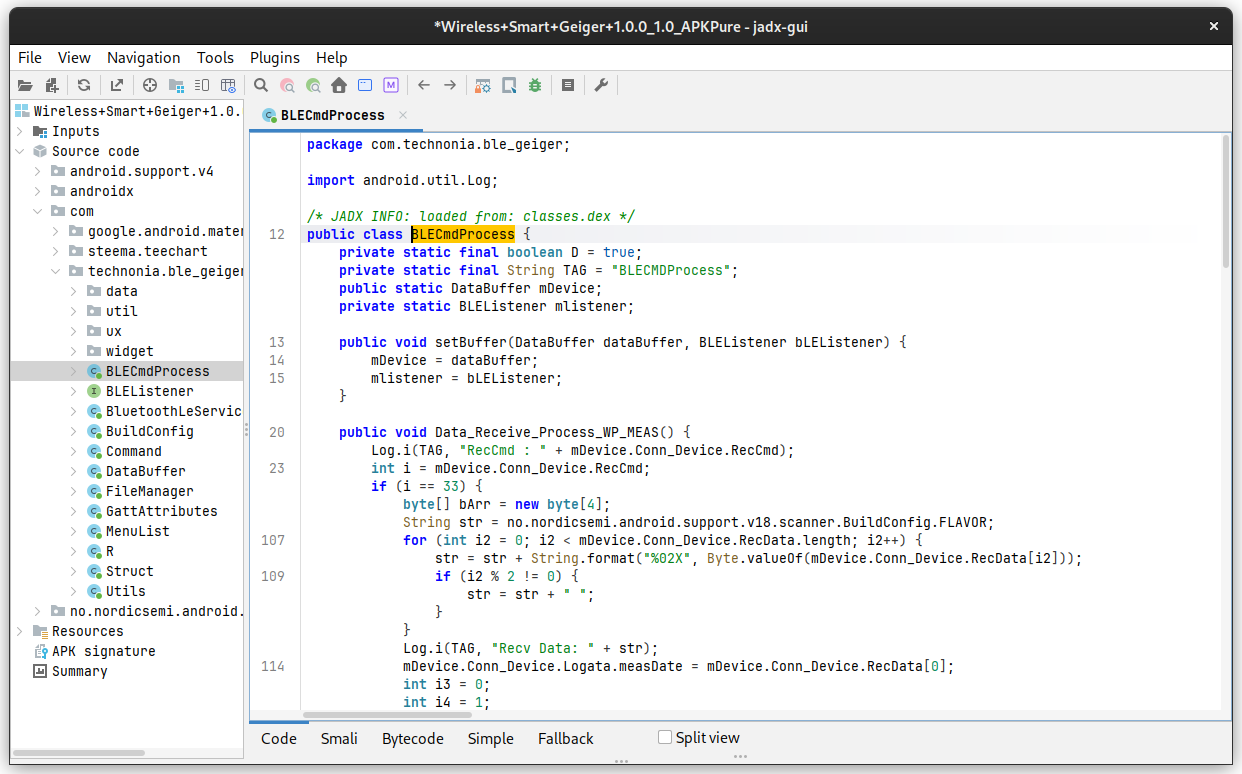
Good news, the code was not obfuscated.
So we can read it quite easily.
Full debug info was not provided at compilation time, so local variable names are still made up by jadx.
Let’s decompile the project into a folder:
$ jadx -d wireless-smart-geiger/ Wireless+Smart+Geiger+1.0.0_1.0_APKPure.apk
In BLECmdProcess.Data_Receive_Process_WP_MEAS we can see it’s listening for the commands 33, 49, 160 in decimal, which are 21, 31 and a0 in hexadecimal.
Just like we found by poking via Bluetooth.
So now we have a reference client implementation that we can learn from to write our own tools to connect to the device from Linux.


 Comments
Add one by emailing me.